Developers Face SEO Challenges In Headless CMS Migration
Headless CMS migration poses SEO challenges, including rebuilding SEO plumbing and ensuring Google gets real HTML. A checklist can help developers navigate these issues.
Original reporting · searchenginewatch.com
Original: “Website migration to a headless CMS: SEO challenges & fixes”
Read “Website migration to a headless CMS: SEO challenges & fixes” at Search Engine Watch →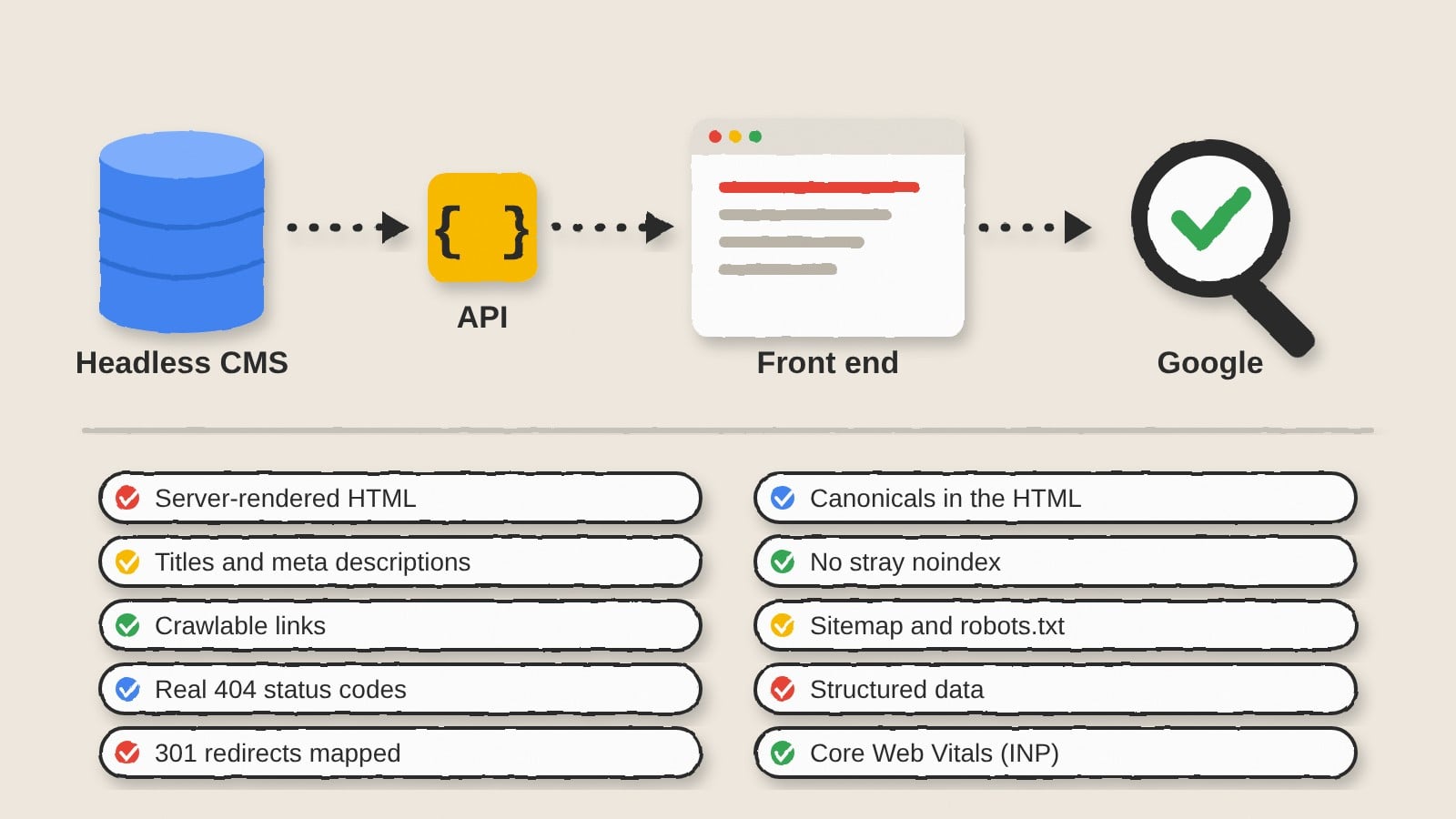
How this was written. The 5:45 Ops Desk wrote this article with a language model from Search Engine Watch’s reporting (model: @cf/meta/llama-3.3-70b-instruct-fp8-fast); it describes that reporting rather than adding to it. The original, linked above, is the full story.
Key points from Search Engine Watch’s report
- Headless CMS migration poses significant SEO challenges, including rebuilding SEO plumbing and ensuring Google gets real HTML.
- Developers need to ensure that the CMS and front end are properly configured to handle SEO metadata, including title tags, canonicals, and Open Graph tags.
- Server-side rendering or pre-rendering is recommended to ensure that Google gets complete and accurate HTML.
- Developers should check that every page that should be indexed is rendered on the server or at build time, and that client-side rendering is only used for interactive elements.
- A checklist can help developers navigate the complex process of headless CMS migration and avoid common SEO pitfalls.
A headless CMS migration is a front-end project that can pose significant SEO challenges. According to Search Engine Watch, the CMS no longer builds pages, but instead stores content and hands it over through an API, and a separate front end decides what HTML Google actually sees.
As a result, all the SEO plumbing that the old CMS handled in the background has to be rebuilt by hand, including title tags, canonicals, redirects, sitemaps, robots rules, and schema. This can be a complex and time-consuming process, and errors can go unnoticed until traffic starts to decline.
One of the main reasons headless migrations go wrong is that they break the traditional CMS model, where one system stores content and prints the page, and a plugin quietly fills in the SEO bits. In a headless setup, the CMS and front end are separate, and the API has to include the relevant fields when the front end asks for the page.
For example, if an editor types a meta description into a field in the CMS, the API has to include that field when the front end asks for the page, and the front end has to actually put it in the head. If any of these steps are skipped, the description will not be visible to Google, and there will be no error message to alert the developer.
To avoid these issues, developers need to ensure that Google gets real HTML, not an empty shell. This means using server-side rendering or pre-rendering, rather than client-side rendering, which can result in empty or incomplete HTML being served to Google.
The Google documentation recommends server-side rendering, static rendering, or hydration, and warns against using dynamic rendering, which is now considered a workaround. Developers should also check that every page that should be indexed is rendered on the server or at build time, and that client-side rendering is only used for interactive elements.
Another key issue is getting titles, descriptions, and Open Graph tags out of the CMS and into the head. This can be a challenge, especially if the front end is not configured to read the relevant fields from the CMS. Developers should pick a few templates and check them manually to ensure that each page has its own title and description in the server HTML, and that Open Graph tags are present and correct.
Questions and answers
What are the main SEO challenges of a headless CMS migration?
The main SEO challenges include rebuilding SEO plumbing, ensuring Google gets real HTML, and getting titles, descriptions, and Open Graph tags out of the CMS and into the head.
Why is server-side rendering recommended for headless CMS migration?
Server-side rendering is recommended because it ensures that Google gets complete and accurate HTML, rather than an empty shell or incomplete HTML.
How can developers ensure that their headless CMS migration is successful from an SEO perspective?
Developers can ensure a successful headless CMS migration by using a checklist to navigate the complex process, and by carefully configuring the CMS and front end to handle SEO metadata and rendering.