Bing Introduces New AI Mode Layout
Bing has introduced a new layout for its AI Mode, featuring a References panel and a relocated query display. This change may improve user experience by providing easier access to source information.
Original reporting · searchenginewatch.com
Original: “Bing shows a different AI Mode layout with a References panel”
Read “Bing shows a different AI Mode layout with a References panel” at Search Engine Watch →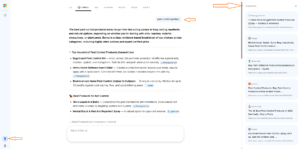
How this was written. The 5:45 Ops Desk wrote this article with a language model from Search Engine Watch’s reporting (model: @cf/meta/llama-3.3-70b-instruct-fp8-fast); it describes that reporting rather than adding to it. The original, linked above, is the full story.
Key points from Search Engine Watch’s report
- Bing has introduced a new layout for its AI Mode, featuring a References panel and a relocated query display.
- The new layout provides easier access to source information and may improve the user experience.
- The introduction of the new layout may be part of Bing's ongoing efforts to enhance its AI capabilities and provide a more competitive alternative to Google.
Bing has introduced a new layout for its AI Mode, according to Search Engine Watch. The updated design features a separate panel on the far right, labelled 'References', which displays source links, website names, and page titles related to the AI-generated response. This change is notable as it allows users to access source links directly alongside the AI-generated response. The new layout also positions the submitted query towards the upper-right side of the response area, rather than the traditional left-hand side.
The addition of the References panel is similar to Google's AI Mode, which also displays a References section with links to its sources. This similarity suggests that Bing may be attempting to provide a more transparent and user-friendly experience for its users. By providing easy access to source information, Bing's new layout may help to build trust with its users.
The new layout is a significant change from the traditional AI Mode design, which typically features the query on the left-hand side. The updated design may take some getting used to for regular Bing users, but it may also provide a more streamlined and efficient experience. The References panel, in particular, may be useful for users who want to verify the accuracy of the AI-generated response or explore the topic further.
Search Engine Watch reported that the new layout was spotted while searching in Bing AI Mode. The discovery was made by comparing the new layout to the traditional AI Mode design, which highlights the changes in query positioning and the addition of the References panel. This comparison suggests that Bing is actively testing and refining its AI Mode design to improve the user experience.
The introduction of the new layout may be part of Bing's ongoing efforts to enhance its AI capabilities and provide a more competitive alternative to Google. By providing a more transparent and user-friendly experience, Bing may be able to attract more users and increase its market share. However, it is unclear how widely the new layout has been rolled out or when it will be available to all users.
The new layout may also have implications for search engine optimization (SEO) strategies, as it provides a new way for users to access source information. This could potentially impact how websites are ranked and displayed in search results, although it is too early to say for certain. Further analysis and testing will be needed to determine the full impact of the new layout on SEO strategies.
Bing's introduction of the new AI Mode layout is the latest in a series of updates and enhancements to its search capabilities. Recently, Bing added an AI visual summary button to its search results, which provides users with a larger view of the content. This suggests that Bing is committed to ongoing innovation and improvement, and may be planning further updates and enhancements in the future.
Questions and answers
What is the new References panel in Bing AI Mode?
The References panel is a separate section that displays source links, website names, and page titles related to the AI-generated response.
How does the new layout differ from the traditional AI Mode design?
The new layout positions the submitted query towards the upper-right side of the response area and adds a separate References panel on the far right.
Is the new layout available to all users?
It is unclear how widely the new layout has been rolled out or when it will be available to all users.